Total Pageviews

Monday, April 23, 2012

Tuesday, February 7, 2012

tempdb database is marked suspect,,

How to recover SQL Server after a tempdb database is marked suspect?

You can refer the below link to resolve the issue-
http://support.microsoft.com/kb/288809

Thursday, February 2, 2012

Msg 3257, Level 16, State 1, Line 2-There is insufficient free space on disk volume 'Drive:\' to create the database

Today there was an activity to perform restore on the PROD server using the TEST database backup file,the

test Backup file is around 23GB, so moved to Production server and started executing the restore command  but the below error has thrown-
Msg 3257, Level 16, State 1, Line 2
There is insufficient free space on disk volume 'R:\' to create the database. The database requires 293066571776 additional free bytes, while only 75202101248 bytes are available.
Msg 3119, Level 16, State 4, Line 2
Problems were identified while planning for the RESTORE statement. Previous messages provide details.
Msg 3013, Level 16, State 1, Line 2
RESTORE DATABASE is terminating abnormally.


So used the below query to see what are the files that exists in the Backup file i,e size,Maxsize, Filegroup,Logical file name and Physical filename.

Restore filelistonly from disk='<Drive>:\XXXXXX.BAK'

so we observed that the Initial size of the MDF file is near to 176GB and remaining other files(1 ndf and 2 ldf files) occupies is 96.93GB ->Over all 272.3G.

But when we have checked - what is the usuage of the database ?

--the database has 78% free space in it & used space is 22%.

how ever our restore strategy  pointing to the drive where it was less space i,e R:Drive has 70.73GB free space out of 120GB, hence the  error throwns that-

"There is insufficient free space on disk volume 'R:\' to create the database. The database requires 293066571776 additional free bytes, while only 75202101248 bytes are available.
Msg 3119, Level 16, State 4, Line 2"


I,e A)the database requires 293066571776 additional free bytes --->Here the whole Database size 272.93GB i,e the Physical files to get initialize on the Physcial disk eventhough the usuage percentage of the database was less.
    B)while only 75202101248 bytes are available ---------->Here clearly expalins that in the  drive which you are restoring is have only 70.73GB hence database not able to Initialize .

so the next error will be as mentioned below -
Msg 3119, Level 16, State 4, Line 2
Problems were identified while planning for the RESTORE statement. Previous messages provide details.
Msg 3013, Level 16, State 1, Line 2
RESTORE DATABASE is terminating abnormally.

To resolve
==========
1.Before taking the Backup of the database --Verify what is the Initial file size and check what is the overall usuage of the indivual file size i,e how much used space & free space.

2.Once identifed then go for altering the initial file sizes using the Alter command or you can go for shrinking then take the backup and restore it on where  ever you want.

3.or If any other drive has enough space to hold then change the restore command i,e where you wan to be Physical files to be

or if you do not have the space then check Muliple drive free space then you can add accordingly.


Bottom Lines
=============
Want to know more about what is the Database file initialization then refer the below links -

http://msdn.microsoft.com/en-us/library/ms175935.aspx
http://sqlskills.com/BLOGS/PAUL/post/Misconceptions-around-instant-file-initialization.aspx
http://sqlserverperformance.wordpress.com/2011/02/10/windows-instant-file-initialization-and-sql-server/
http://sqlblog.com/blogs/tibor_karaszi/archive/2009/03/09/do-you-have-instant-file-initialization.aspx
http://www.databasejournal.com/features/mssql/article.php/3899156/Instant-File-Initialization-for-SQL-Server-20052008.htm


Thanks,
Rama Udaya.K

Monday, January 16, 2012

Higher to Lower version restoration!

Can we restore the database of Higher to Lower version restoration?
OK let's Plan like this -Backup the database of SQL server 2008(before backing up change the Database compatible level to 90) then restore the database on SQL server 2005.


Backup completed of SQL server 2008 database after changing 100 to 90.


Now I will go for the restoring the database on SQL server 2005 -let's see what it throws an error even though changed the compatibility of the database-


 So I plan to see what the Header of the Backup file to get some information about Backup file, how ever it is failed to reterive data in SQL server 2005 & it throws sam error-
 So one way we can do, not restore method but we can use script out method so,Let's see how it is.
*Log in to the SQL server 2008 ->select the database( which you want place in sql server 2005) ->Right click Tasks ->Generate the scripts and change the script for server version to your comfortable version.

Please see the below figures:-


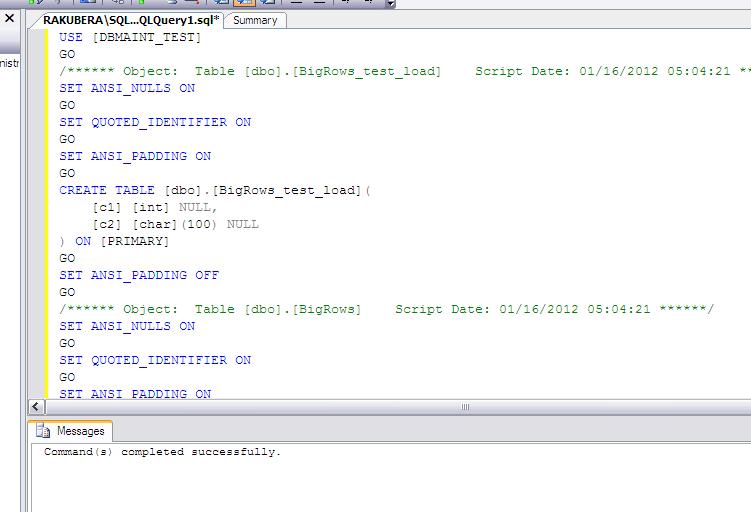
Now I will use the above scripts and will execute in the new query window of SQL server 2005 -
(see the figure below)  before that I have created an dummy database called :DBMAINT_TEST
after executing the script you will get the outpuy as Command's completed successfully........(please see fig)


Finally it's done


Bottom Lines
---------------
1.You cannot restore the database from Higher to Lower version.
2You can also use -Import and export wizard instead of Generate SQL Server Scripts Wizard. This solution exports data to the targeted SQL Server using a wizard. It is more secure and effective than the first solution. But you can only export tables and views only.
3.Note ->When you restore or attach a database which is created from SQL Server 2008 to SQL Server 2005 or SQL Server 2000, you will get an error so other way you can use is the Bottomline 2 options.

Thank you!!!


Monday, January 2, 2012

Msg 22004, Level 16, State 1, Line 0

Today I was working on Producing the Deadlock in My local Machine, hence I have enabled the trace flag globally ,I did the work and made the Deadlock situation,so I Planned to read SQL error log so I hit the command in an new query window(even I was not able to view in SSMS as well) ->Got the below error message:

Msg 22004, Level 16, State 1, Line 0
Failed to open loopback connection. Please see event log for more information.
Msg 22004, Level 16, State 1, Line 0
error log location not found


so to trouble shoot this one I have checked the below things(Note that the issue depends on the various reason & I have showed what caused in my case).
==================================================================================================
1.Verified the SQL error log file exists in the proper path(Of course if the SQL error log path is in correct the SQL server Won't start up).


2.Verified at the regsitry level of SQL log Path =>There is no issues at all.

3.verified at the Folder level permissions and Local administrators level =>No issues at all.

so as in the error it shows clearly that "Msg 22004, Level 16, State 1, Line 0,Failed to open loopback connection. Please see event log for more information.
Msg 22004, Level 16, State 1, Line 0
error log location not found"

So I moved to Event logs --Found some of the valuable informations as mentioned below-

Event Type:    Error
Event Source:    MSSQLSERVER
Event Category:    (2)
Event ID:    17052
Date:        02/01/2012
Time:        08:56:22
User:        N/A
Computer:    RAKUBERA
Description:
Severity: 16 Error:-1, OS: -1 [Microsoft][SQL Server Native Client 10.0]SQL Server Network Interfaces: Error getting enabled protocols list from registry [xFFFFFFFF].

For more information, see Help and Support Center at http://go.microsoft.com/fwlink/events.asp.
=====================================================================
Event Type:    Error
Event Source:    MSSQLSERVER
Event Category:    (2)
Event ID:    17052
Date:        02/01/2012
Time:        08:57:56
User:        N/A
Computer:    RAKUBERA
Description:
Severity: 16 Error:-1, OS: -1 [Microsoft][SQL Server Native Client 10.0]SQL Server Network Interfaces: Error getting enabled protocols list from registry [xFFFFFFFF].

For more information, see Help and Support Center at http://go.microsoft.com/fwlink/events.asp.
==================================================================
Event Type:    Error
Event Source:    MSSQLSERVER
Event Category:    (2)
Event ID:    17052
Date:        02/01/2012
Time:        09:01:10
User:        N/A
Computer:    RAKUBERA
Description:
Severity: 16 Error:-1, OS: -1 [Microsoft][SQL Server Native Client 10.0]SQL Server Network Interfaces: Error getting enabled protocols list from registry [xFFFFFFFF].

For more information, see Help and Support Center at http://go.microsoft.com/fwlink/events.asp.
==========================================================
Event Type:    Error
Event Source:    MSSQLSERVER
Event Category:    (2)
Event ID:    17052
Date:        02/01/2012
Time:        09:01:40
User:        N/A
Computer:    RAKUBERA
Description:
Severity: 16 Error:-1, OS: -1 [Microsoft][SQL Server Native Client 10.0]SQL Server Network Interfaces: Error getting enabled protocols list from registry [xFFFFFFFF].

For more information, see Help and Support Center at http://go.microsoft.com/fwlink/events.asp.
========================================================================
In the SQL agent log I can see below messages:

2012-01-02 02:10:26 - ! [298] SQLServer Error: 65535, SQL Server Network Interfaces: Error getting enabled protocols list from registry [xFFFFFFFF]. [SQLSTATE 08001]
2012-01-02 02:10:26 - ! [165] ODBC Error: 0, Login timeout expired [SQLSTATE HYT00]
2012-01-02 02:10:26 - ! [298] SQLServer Error: 65535, A network-related or instance-specific error has occurred while establishing a connection to SQL Server. Server is not found or not accessible. Check if instance name is correct and if SQL Server is configured to allow remote connections. For more information see SQL Server Books Online. [SQLSTATE 08001]
2012-01-02 02:10:26 - ! [000] Unable to connect to server 'RAKUBERA\SQL2K8'; SQLServerAgent cannot start


How ever there is no relations b/w the Agent and SQL Errorlog, How ever it provides valuable informations..

In My case is that ->I have SQL database engine local machine only (Obviously both Client & server is in same machine), I start checking the SQL Native clients via configuration Manger -->all the Protocols were disabled state , So I have checked the protocols of My SQL server 2008 what is the order of protocols :It was first shared memory,Named pipes then Tcp IP and VIA was in disbaled state...

so to resolve I went & enabled the protocols of Shared Memory then I executed the =>Exec xp_readerrorlog then Iam able to view the data in query window, also I was able to see in SSMS.

Bottom Lines
========
1.Ensure that before performing understand the Logs properly, before peforming on Production check it in your test box.

2.Also the above issues arises in difference cases ==>The similar type of issue recevide in different situation --->see some of the below Links-What other person faced the similar issue and how he resolved(Thanks to them).

http://sqlserverpedia.com/blog/sql-server-bloggers/error-log-location-not-found/
http://www.pythian.com/news/27905/sql-serveropening-errorlogfailed-to-retrieve-data-for-this-request-microsoft-sqlserver-management-sdk-sfc/
http://www.sqlservercentral.com/Forums/Topic767980-146-1.aspx
http://ms-abhay.blogspot.com/2010/09/msg-22004-level-16-state-1-line-0.html


Sunday, January 1, 2012

Trace Flags.

About  Trace flags
============
Trace flags are used for temporarily or Permanently(when you specified in startup parameters) i,e  It depends on individual decisions for their applications(Note that you need to understand Properly -why you are enabling it & what will be the Impact on that if it is enabled.) to work on the troubleshotting purposes or to track the activities either Globally or session .

Types of Trace Flags?
===============

There are 2 Types of Trace flag -> 1,session Trace flag  2. global Trace flag.

Session Trace flag :It is only for the active connection and that will be visible only for that connection & effect of trace flag will losts once the SPID connections logs out from it's opened session.
                              (note that It won't affect for other sessions)

Global Trace flag : This will be set at the SQL server instance Level and it will be for all the connections


How to Enable/Disable or ON/OFF trace flags?
============================

To Turn on you have to use
DBCC TRACEON

To Turn off you have to use
 DBCC TRACEOFF


How to set on/off the trace flags globally?
===========================
You can use "-1" with your DBCC TRACEON  & DBCC TRACEOFF.
For eg:

DBCC TRACEON (4616, -1)
GO

Suppose if you want to enable Multiple trace flags just you can put Comma between trace flags ex :DBCC TRACEON (4616,7806,2528 -1)

To turn off replace ON with OFF.

How to check what traceflags are active/ON?

You can use DBCC TRACESTATUS  query to determine which trace flags are currently active whether it is Global/session.

see the below


How to displays the status of all trace flags that are currently enabled globally?
=================================================
You can use :
DBCC TRACESTATUS(-1)
GO

Bottom Lines
==========
1.As per BOL
---------
Some flags can only be enabled as global, and some can be enabled at either global or session scope.

The following rules apply:

    A global trace flag must be enabled globally. Otherwise, the trace flag has no effect. We recommend that you enable global trace flags at startup, by using the -T command line option.
    If a trace flag has either global or session scope, it can be enabled with the appropriate scope. A trace flag that is enabled at the session level never affects another session, and the effect of the trace flag is lost when the SPID that opened the session logs out.

Trace flags are set on or off by using either of the following methods:

    Using the DBCC TRACEON and DBCC TRACEOFF commands.
    For example, DBCC TRACEON 2528: To enable the trace flag globally, use DBCC TRACEON with the -1 argument: DBCC TRACEON 2528, -1. To turn off a global trace flag, use DBCC TRACEOFF with the -1 argument.
    Using the -T startup option to specify that the trace flag be set on during startup.
    The -T startup option enables a trace flag globally. You cannot enable a session-level trace flag by using a startup option.


2.Once the trace flag is turned on, it remains On until either you manually turned off or if it is SQL Server restarted.

Thursday, December 29, 2011

INDEXES in ALL angles -1

I want to share something today, one of my friends asked me the question about Index-the one which he asked me is that what happens if I disabled the clustered Indexes on table or view?

Start from beginning I was try to understand about the indexes --It was difficult to understand(I believe for the experience people as well).

But Iam much ok & got an good Idea on the Indexes.

So Iam starting this  topic INDEXES in ALL angles -1 as an FAQ's for those who is preparing for the Interview (I will answers all questions shortly-sure If I get time).

In then Next year i,e next Month of Jan,Iam  taking session  on In and Out of Indexes in the office.(may be January 4th week).

Ok Lets start the Journey on Indexes.

1.What is Index and why it is required in RDBMS, How query optimizer will take advantage of good index choose by smart Developer or Vendor?Ofcourse DBA!

2.How Many types of indexes in SQL server 2000/2005/2008/R2/Denali/2012 & what are those?

3.What is B-tree structure and how you can identify how many b-structures you have & what are the levels it has(levels are like -Root node,Intermediate and Leaf level nodes)?

4.What are the major's differences B/w clustered and Non-clustered indexes?

5.What happens if I disable the clustered index on an table & what about the Non-clustered indexes?

6.Is there any way can I enable the clustered indexes, if yes how it is?


6.How query optimizer decides whether it has to go with Index scan or entire table scans?


7.Is that good option keeping too many indexes , because you know that the index is an good option for retrieving the data efficiently for the users as well as for the SQL server database engine (bcz Good index can
reduces the larger Physical I/O)?

8.Can always root node exists?


9.Will always Index get benefits for the users & database engine?

10.what is the meaning of Index page & data pages?

11.What is Keys? & How keys behaves in RDBMS?

12.Can I create an non-clustered index if the clustered index disabled?

13.What happens to the Non-clustered index,if I drop the clustered index?

14.Can I rename the Index, if so how & what is the causes if I rename the index?

15.How to: Move an Existing Index to a Different Filegroup?

16.How data will retrieve if no indexes exists in sql server?

17.why it is Index Sort Order?

Fragmentation's:
============
1.What is fragmentation in SQL server?

2.How many types of fragmentation's and why the fragmentation occurs?

3.What is the disadvantages of Fragmentation in SQL server?

4.You may have seen that after rebuilding the indexes still shows the fragmentation is same or High percentage, why is it so?

5.what is fill factor and how I can decide the proper fill factor?

6.When to Rebuild/Re-organize?

7.Can heavy Fragmentation dist rubes the business like timeout errors, takes more time to get the reports during urgent time?

8.How can I rebuild the indexes and how many modes we can rebuild the indexes.

9.What is the difference between Onilne rebuild /Off line rebuild index?

10.How internally works the rebuild index(you know that the rebuild indexes flows in three ways)?


11.What factors I need to consider before rebuilding the Indexes like as mentioned below -

A)How can we estimate the log file size before rebuilding the index?

B)what about the Filegroup size?

C)Proper tempdb space (if you have used the option sort_tempdb =on)?

D)how to decide the you need to rebuild online or offline?

E)Best practices?

12.what are all the Index Options available & how we will get benifits?

13.Why fill-factor , how page splitting occurs & how we can reduce?

14.What types of locks puts during the rebuild indexes(i,e here consider the 3phases)?

15.How to rebuild the indexes on single index or on entire tables?

16. My OS disk got fragmented then what is the Impact on the Indexes?

17.Whar Recovery Model I need to select for  Index Operations and how it behaves?

----I will post some more FAQ's-------------

Bottom Line:
========
1.In SQL server 2008 what ever may be the recovery model the Index operation is full logged.

2.A)Online index operations are available only in SQL Server 2005 Enterprise Edition.
   B)Online index operations are available only in SQL Server Enterprise, Developer, and Evaluation editions --->Denali and SQL server 2008/R2
3..Index-Related Dynamic Management Views and Functions --in SQL server 2005/2008/R2 and Denali
sys.dm_db_index_operational_stats
sys.dm_db_index_physical_stats
sys.dm_db_index_usage_stats
sys.dm_db_missing_index_columns
sys.dm_db_missing_index_details
sys.dm_db_missing_index_groups
sys.dm_db_missing_index_group_stats

4.In SQL server 2005 ->Number of clustered index is 1 and remaining 2 to 249 Non-clustered indexes  ==>Similar in 32 bit & 64 Bit .

In SQL server 2008/R2/Denali ->Number of clustered index is 1 and remaining 2 to 999 Non-clustered indexes  ==>Similar in 32 bit & 64 Bit .

All the Best Guys!!!!!

Saturday, December 24, 2011

Concurrent Administrative Operations..

I want to share about the Concurrent operations at database level i,e in an mind may arise questions like-
A)Can we do Backup and shrink at the same time?
B)Can we add additional Database files when Backup is running?
C)Can we do Full backup database along with the differential Backup?

As we know that during any Backup operation(either full,log or differential) it's not possible to do the add/remove additonal files, shrink, file modify(alter).

You can easily do in your test machine, how ever for Pictorical if you need then Please refer the below links

Link :http://technet.microsoft.com/en-us/library/ms189315%28SQL.90%29.aspx


Sunday, December 11, 2011

TEMPDB is Not allowing to Shrink to release the Space to OS

We are getting  many alerts for one of the drive (it has user and System db files as well ---the MDF and LDF files shoudn't beon same  drive how ever it was built by some one(will take actions on this) and so my team met was planning to shrink the tempdb files, but it was not allowing him to shrink,he checked all the ways i,e checked

any Open transactions,any SPID is using tempdb,any Jobs are running etc.... nothing worked, even I also tried it
 it was not allowing , so I had 2 options in My mind 1.To restart the SQL server services 2.clear the procedure cache.

1st option I can use but due to weekend there were no business people on duty  and since ours is financila account it is an Lenghty processes , so at present to resolve I went with the Danger option of clearing the Procedure cache.

Note ->IThe DBCC FREEPROCCACHE command clears the procedure cache for all the procedures on the server. hence we need to use very care fully.

Why carefully?

"DBCC FREEPROCCACHE to clear the procedure cache. Freeing the procedure cache causes, for example, an ad hoc SQL statement to be recompiled instead of reused from the cache. This can cause a sudden, temporary decrease in query performance. In SQL Server 2005 Service Pack 2, for each cleared cachstore in the plan cache, the SQL Server error log will contain the following informational message: "SQL Server has encountered %d occurrence(s) of cachestore flush for the '%s' cachestore (part of plan cache) due to 'DBCC FREEPROCCACHE' or 'DBCC FREESYSTEMCACHE' operations." This message is logged every five minutes as long as the cache is flushed within that time interval".

Since I have checked that all user db's are not in big size & also there were no user's activity during that point of time hence I have used   DBCC FREEPROCCACHE then did the shrink operation ->So then it allowed the shrink operation.


Tuesday, November 15, 2011

SQL server Enterprise Manager is not opening when user was trying.

One of the user reported that he is not able open SQL server Enterprise Manager , giving below error:


when I also tried it was giving the same error( I have verified that there were no permission issue).

then go to the below path :C:\Program Files\Microsoft SQL Server\80\Tools\BINN   --->There will be
SQL server enterprise manager.MSC , if not exists then you can resolve performing below  steps
(In My case the SQL server enterprise manager  was exists).


Steps:

1.Go to services.msc ->ensure the Windows Management Instrumentation  is in started state.

2.Start->run ->type mmc.exe ->you can see console root will open and perform the below steps:

go to file Menu->Add/Remove Snapin..->In standalone Tab ->click on Add ->below window will open & select the Microsoft SQL Enterprise Manager ->click on Add-


Click on OK-


then go to File menu(in the same screen) ->Save as -> then give the Name as SQL server Enterprise Manager.MSC ->Save.


when closing existing one i,e which you have opened from add/remove snapin....  it will ask for  to save click on Yes see the below screenshot-


then go to the path :C:\Program Files\Microsoft SQL Server\80\Tools\BINN  -->verify  MMC for enterprise manager has been created(see below)  and set appropriate permissions.-


Note 2:  If already the SQL server enterprise manager.MSC exists in path still you have the same issue(as mentioned above error) then you can perform below steps:

Rename the old one SQL server enterprise manager.MMC to  any name(verfiy the permissions what it exists) , then follow the same steps as mentioned above i,e from Add/Remove snapin..

(or)

simple way -> you can copy from other server as well which has the same versions in to the path :C:\Program Files\Microsoft SQL Server\80\Tools\BINN  if doesnot exits.


Bottom Lines
---------------

Where is my Enterprise manger(SQL server 2000),SQL server Managment studio(SQL server 2005 and SQL server 2008) were exists at the OS level.


You can check below ways using simple way(There are many other way as well).

SQL server 2000
-------------

Start->All Programs->Microsoft SQL server ->Entrprise Manager->Right Click Properties-> open shortcut Tab ->you can see the path of where the MSC exists for SQL server Enterprise manager-


for ex->C:\WINDOWS\system32\mmc.exe /s "C:\Program Files\Microsoft SQL Server\80\Tools\BINN\SQL Server Enterprise Manager.MSC"


SQL server 2005
------------
Start->All Programs->Microsoft SQL server  2005->SQL server Management Studio->Right click Properties->go to shortcut tab ->you can  see below path

"C:\Program Files\Microsoft SQL Server\90\Tools\Binn\VSShell\Common7\IDE\SqlWb.exe"


Note ->SQLWB.EXE is for SQL server 2005, for SQL server 2008 it is different i,e ssms.exe

you can execute exe in start->run itself.


SQL server 2008
-------------
Start->All Programs->Microsoft SQL server  2008 ->SQL server Management Studio->Right click Properties->go to shortcut tab ->you can  see below path

"C:\Program Files\Microsoft SQL Server\100\Tools\Binn\VSShell\Common7\IDE\Ssms.exe"


Note ->Still using SQL server 2000 query analyzer --you can connect to SQL sever 2005 & SQL server 2008.


Monday, November 14, 2011

About COPY_ONLY Backups in SQL server 2005.


Thanks to Microsoft for introducing the COPY_ONLY Backups in SQL server 2005.

As all we know that  is an special Backup and it won’t affects/Interrupt to the regular Backups/Restore sequences .
For example consider that your Backup strategy as mentioned below:

1.Full Backup ->Daily at 18PM EST
2.Differential Backup ->Thrice an day I,e 10AM, 13PM, 16PM
3.Log backup ->Every 10 Minute(s).
Now consider  that your customer asked that they need full back of the database from the production
Server at 14PM EST(just an example).
Consider now the time is  14PM EST .

So you have to give backups from last night full backup (+)All differential backup(+ )additional transaction log backups so this will be lengthy steps for the restoration on test server.

So if you take the full backup manually at 14PM est  then your next differential backups depends tightly on this full backup(I,e which we have taken full Backup at 14 PM EST) so your Backup strategy has been disturbed and for your restore recovery Plan as well (I,e you have very well plan of backup/restore sequences  incase of recovery of the database to point in time) & you need to restore the database according to same strategy, so thanks to Microsoft for  Introducing  new feature I,e called COPY_ONLY Backups.So this option will not disturb your planned Backup/restore sequence. 

 Now in your mind questions may arise what about the LSN sequences?
If yes, please see the below example.

Example:
I have taken full Backup of the database: AdventureWorksDW   so the LSN sequence as mentioned below-

See LSN’s


Now consider that trn log backup status-
(I have the Maintenance plan job which backups transactions every 10 Minute(s) )

so see below my next trn backup completed status:


The Lsn sequence as shown below-


See below the next trn backup run status as mentioned below-


The 08:10 AM LSN’s as mentioned below-


Now let take the Log backup manually using the COPY_ONLY Backup-


See the physical log backup file 


Now check the LSN’s-

So now My another log backup which runs at 08:20AM EST.

See the Log backup completed at 08:20AM EST and check the LSN’s-


So now you compare the COPY_ONLY backups and 08:20AM EST Log backups LSN’s sequence
Both are same (as shown below).


Now see how your restore works
1.I need to restore first full Backup .
2.Next I need to restore Trn Log backups I,e the  restore sequence is 08:01 TRN , 08:10 AM  and 08:20AM but note that I took log backup at 08:15AM EST by manually using COPY_ONLY Backup
Let see whether the restoration works or not(It has to work because I have already showed of LSN sequences ).

Step1:Restored the first  full Backup


So now you need to execute below queries:

Restore Log [AdventureWorksDW] FROM  DISK = N'C:\TRN Backups\AdventureWorksDW_backup_201111140801.trn' with Norecovery   --08:01AM
go
Restore Log [AdventureWorksDW] FROM  DISK = N'C:\TRN Backups\AdventureWorksDW_backup_201111140810.trn' with Norecovery   --08:10AM
go
Restore Log [AdventureWorksDW] FROM  DISK = N'C:\TRN Backups\AdventureWorksDW_backup_201111140820.trn' with recovery     --08:20AM
go

see below I have executed 08:01 & 08:10 AM EST log backups –those are Completed successfully and finally executed the 08:20AM.
output of 08:20 AM EST as mentioned below-


See below the database status àIt is running fine without any issues-


So this is how the  COPY_ONLY Backups works( Just FYI.. you can also test in your test boxes performing DML operations then do the test how copy_only backup works).

------------------------********--------------------------------------*******------------------------
Bottom Line:
1.Next question may arise that can  I do same restoration activity sequence Log backup taken using COPY_Backup T-sql  I,e restoring 08:15AM log backup instead of 08:20AM
Instead of 08:20AMWill Copy trn restore will work for restoration incase my 08:20 AM log backup deleted I,e I want restore the log backup which I used the COPY trn.
àI have tested and it is worked fine.
2. Also this may ask in the interview -àLike  without breaking the log shipping  how can you take the log backup at particular time?
I,e if you take log backup manually on primary database then the transaction log backup for log shipping will disturb  & Restore jobs will get fail –To resolve this you again manually need to restore the log backup which you taken log backup manually, hence Incase if you have fall in this situation COPY_ONLY Backup plays important role.
3.Note the full backup and log backup activity both are different it is not similar.
4.As per BOL –you need to keep below things in the mind
You can create a copy-only backup for any type of backup:
·         Copy-only data backups (all recovery models)

To create a copy-only data or differential backup, use the COPY_ONLY option in your BACKUP DATABASE statement. A data backup taken with the COPY_ONLY option cannot be used as a base backup and does not affect any existing differential backups.
·         Copy-only differential backups

These are identical to regular differential backups.
·         Copy-only log backups

To create a copy-only log backup, use the COPY_ONLY option in your BACKUP LOG statement; doing so causes backup to retain the current log archive point. Also, the transaction log is not truncated by a log backup taken using the COPY_ONLY option. Without COPY_ONLY, a BACKUP LOG WITH NORECOVERY would advance the log archive point.
Note:Copy-only backups can be created or restored only by using the BACKUP and RESTORE Transact-SQL statements. SQL Server Management Studio does not support these backups.
    COPY_ONLY backups are recorded in the backupset table in the is_copy_only column. 


When to Run DBCC CHECKDB or Best Practise?

When to Run DBCC CHECKDB or Best Practise?

If your database is very small then no worries you can run and see the results,how ever if the Database is very large then you have to take right decision when you can run--

Because DBCC CHECKDB is a CPU- and disk I/O intensive operation. Each data page it has to scan &   first it has to be read from disk into memory. SQL server database engine uses  tempdb to do sorting operations for it's own(note in SQL server 2005 if you have not specified Sort_tempdb =Off, the sorting operation runs on the same database which you fired the query DBCC CHECKDB)


So you can use  the below Recommendations for DBCC  considering the Performance point of view:

   1.Identify that the prefer time where the system usage is low.

   2. Ensure that you are not performing any other disk I/O operations, Like SQL database backups to disk.

   3.Always good Pratcise that place tempdb  database files on a separate disk system or a fast disk subsystem, so that you can Avoid I/O.

    Also ensure that you have enough space for tempdb to expand on the drive. you Use DBCC with ESTIMATE ONLY to estimate how much space will be needed for tempdb.

   4. Avoid running Bulk queries which can cause CPU to eat like intensive queries or batch jobs or adhoc queries.

   5. Reduce active transactions while a DBCC command is running.

Because If actively performing transactions while DBCC CHECKDB is running, the transaction log continues to grow because the DBCC command blocks log truncation until it has finished reading the log.

   6. Use the NO_INFOMSGS option DBCC command to reduce processing and tempdb usage significantly.

Note that :DBCC CHECKDB will fails/Terminates to complete in below situation(there are many reasons which fails few are which I have seen as mentioned below).

A)When system tables got corrupted.
B)When you have ran DBCC CHECKDB  during busy hours -due to insufficient memory available to run DBCC CHECKDB
C)When your Temdb database files runs out of space.

Please add if you know some more.

Ad hoc update to system catalogs is not supported. (Microsoft SQL Server, Error: 5808)

Today I was working on Configuring Database Mail in SQL server 2005, I got an below SQL words

"Ad hoc update to system catalogs is not supported. (Microsoft SQL Server, Error: 5808)"

So to resolve this issue : You need to perform below steps to work around

sp_configure 'allow updates', 0;
reconfigure;


Warning  Incorrect modification of the system catalogs can result in database corruption or data loss as per BOL, Also we shouldn't not do anything to the system catalog without understanding the Impact before & after Implement.

Sunday, November 6, 2011

How to determine the version and edition of SQL Server and its components.

I hope everyone knows how to find the sql server version for Database engine & it's components.
If someone want to know you can refer the below KB link.
http://support.microsoft.com/kb/321185


Thursday, November 3, 2011

How to Change Maintenance Plan owner in SQL server 2005.


Yesterday one of my colleagues modified the Maintenance plan, where that Maintenance plan performs
Backup and cleanup tasks for user databases (The jobs were running without any issues before the Maintenance plan modify).

Here is the small story-

We are getting the disk space alerts for one of our servers and to resolve this we plan to change the retention period of cleanup tasks for 3 days to some Hours(>48Hours). So my colleague modified the Maintenance Plan for cleanup task & saved the maintenance plan.
But today when I was in work received the alert that Job has failed which was created via Maintenance plan (the one which was modified yesterday).

Job failure information as mentioned below-


What happened the Maintenance plan was created by one of our colleagues and he moved to different
Account & his current accesses revoked by Security team as per our project policy.

Hence yesterday the maintenance plan modified by other colleague ->by default the Maintenance plan/Package owner has reflected to Job owner because of modification, hence the job was failed with the above reason.

To fix permanently we need to modify the Maintenance plan/Package owner –so I decided to put

Maintenance plan Owner as our service account and I have completed with the below  T-Sql

--You can use  the table of MSDB to get  who is the owner by taking  the information of Ownersid

Table name is as mentioned below

select * from dbo.sysdtspackages90

so using above you can use suser_name to get the owner for the maintenance plan/Package..

SELECT

name, description,suser_sname(ownersid),isencrypted

FROM

msdb.dbo.sysdtspackages90

--Now we have to update the owner to an appropriate domain account. Either the service account or any other account is Ok for you.

(Before performing below step –take MSDB Backup not required but best practice).

UPDATE

msdb.dbo.sysdtspackages90

SET

OWNERSID = SUSER_SID('YOUR_DOMAIN_NAME\ACCOUNT_NAME') --------to which account you are going to change

WHERE

OWNERSID = SUSER_SID('YOUR_DOMAIN_NAME\OLD_ACCOUNT') ----------The old account name ---i,e the job which is failing with this account.

after executing you will get output as 1(rows) affected.
Verify once again to check Maintenance plan owner changed or not, After this I have executed the job
It completed without any issues.
(If you need you change the job owner to SA).